

Instant Intelligence for Every Indicator of Compromise (IoC)
Manage and mitigate an array of external cyber security threats with one unified solution.
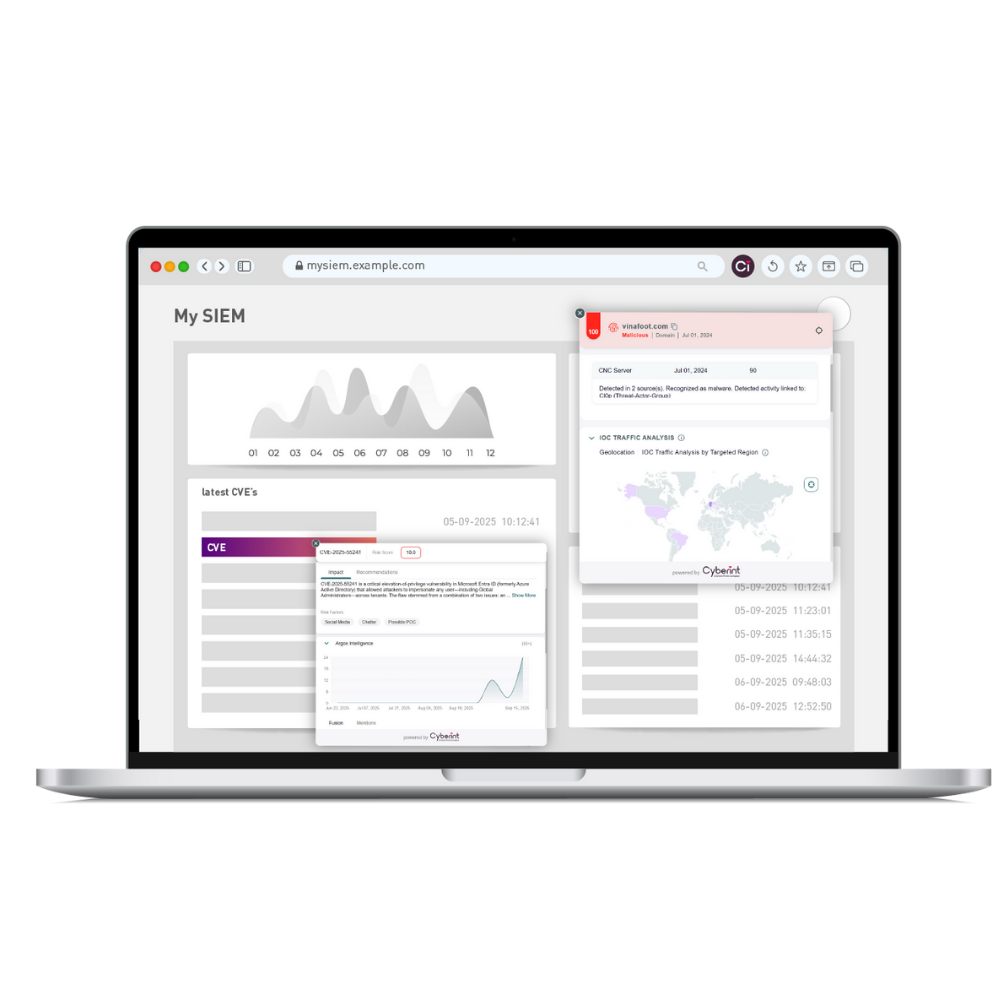























Leverage Threat Intelligence With Analyst Workflows

Deliver Intel to Analyst

On Demand Intelligence View

Contextualized IoC Classification

Enforcement-Ready Intelligence
Automatic IoC Recognition on Any Webpage or Web App
The plugin automatically detects domains, IPs, URLs, hashes, and CVEs inside emails, tickets, reports, OSINT blogs, chats, or docs bringing intelligence directly to the analyst, not the other way around.
Surface Exposure Gaps Across Your Stack
Use the plugin to immediately see whether you can block, hunt, or take down the IOC today or whether enrichment, correlation, or security control coverage is missing.
Enrichment That Explains, Not Just Labels
Understand threat type, malware family, actor attribution, campaign context, observed activity, geolocation, and confidence level within seconds without manually switching between consoles.
Built-In Threat Analytics for Faster Judgement
Traffic patterns, targeting data, infrastructure mapping, geo-distribution, and activity trends reveal how a single IOC participates in wider campaigns and which industries are being hit.
A Unified Solution Covering the Full CTEM cycle: Intelligence-led, Remediation-driven
-

Turn Exposure Insight into Continuous Risk Reduction
Learn MoreCombine threat intelligence, vulnerability prioritization, and safe remediation into a single operational loop so exposures are identified, validated, and closed before attackers can exploit them.
-

See What Attackers Are Targeting Right Now
Learn MoreUnderstand which threats pose immediate risk to your business by mapping active attacker behavior directly to your environment.
-

Prioritize Exposures That Reduce Immediate Risk
Learn MoreCorrelate exploitability, reachability, threat activity, and business impact to guide smarter remediation decisions.
-
Fix Exposures Without Breaking Business Continuity
Learn MoreAutomatically validate and then safely enforce remediation across your security stack without disrupting uptime or operations.
FAQ – Below are answers to the most frequently asked questions about Check Point Intelligence.
How do I access Check Point Intelligence?
To use Check Point Intelligence, you need an active Check Point Infinity Portal account.
You can register here: Register here
Once registered, you can log in and enable the Check Point Intelligence browser extension.
How do I extend my session timeout?
There are two ways to extend or manage your session timeout settings:
- Option 1: Update Session Settings in Infinity Portal
Force Login After: Defines how long you may remain signed in before being required to log in again. Default: 1 day.
Idle Session Timeout After: Defines how long the session stays active when there is no user activity. After this period, the portal prompts you to renew your session without a full login. Default: 15 minutes.
- Option 2: Authenticate Using an API Key
You may also log in using an API Key with a longer expiration period. Learn how to generate an API Key here.
What is the intelligence data based on?
Check Point’s threat intelligence is powered by a global network of firewalls and security sensors. This network inspects billions of websites and files for risk and identifies an average of 1.7 million new indicators of compromise (IoCs) every day.
What IOC status values are available, and what do they mean?
Indicators may be assigned one of the following statuses:
- Malicious – The indicator has been identified as malicious based on recent observations.
- Benign – The indicator is known to be safe and classified as non-malicious.
- Inconclusive (displayed in yellow) – There is not enough information available to determine whether the indicator is malicious or benign.
Can I export the findings from the extension?
At this time, exporting results directly from the extension is not supported.
Do I need an account to use the extension?
Yes. You must have a valid Infinity Portal account in order to use the Check Point Intelligence extension.
Where can I learn more about Check Point Threat Intelligence capabilities?
You can learn more through Check Point’s Threat Intelligence resources here
Learn More About Exposure Management

Instant Intelligence.
Operate Continuously.
Visit the Chrome Web Store and download the Check Point Intelligence extension and start transforming your IoCs actionable intelligence.


